ANALOGALCHEMY / GUIDES / SETTINGS THAT MATTER
From text prompt to finished song: the settings that matter.
GUIDE · UPDATED JUNE 2026 · CFG · STEPS · SEED · TEMP
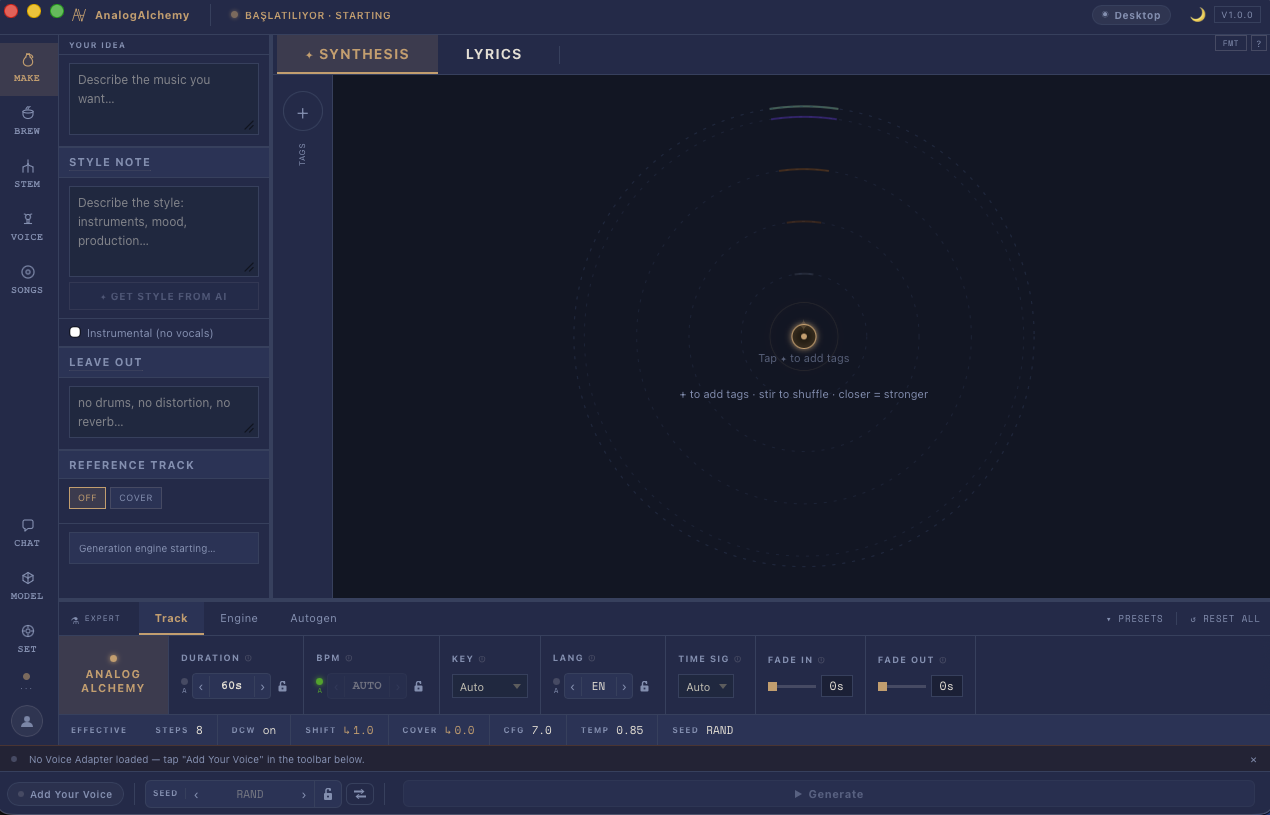
Every AI music tool hides the same handful of dials behind different names, and most people either never touch them or twist everything at once. This guide explains what each one actually does — in plain language — and the workflow that turns "decent first try" into "keeper take". The screenshots are from AnalogAlchemy's Make screen, where the dials live in the Expert Deck; because generation is local and uncapped, experimenting with them is free.
The prompt does the heavy lifting
Before any dial: the text. Describe the song like you'd brief a producer — genre, mood, instrumentation, vocal character, one image. "Slow-burning arabesk; strings and bağlama; a man singing to an empty road; builds to a desperate chorus." Then pull tags into the tag orbit — dragging POP or TURKISH ARABESK closer to the ember strengthens its pull. Stuck at one line? The Style-from-AI button expands your idea into a full brief you can edit.
CFG — the obedience dial
CFG (guidance) sets how literally the model follows your text. Think of it as briefing a session musician: too loose and they play what they feel like; too strict and the performance goes stiff. Default ~7 is home base. Result ignoring your prompt? Nudge up. Result technically-correct but lifeless? Nudge down. Move in small steps; CFG is sensitive.
Steps — the polish dial
Steps are refinement passes. More steps, more compute time, better detail — with hard diminishing returns. The practical pattern: low steps while hunting (fast drafts, many ideas), high steps once for the final render of the take you're keeping.
Seed — the reproducibility dial
The seed is where the randomness starts. On random, every run is a fresh lottery — great for exploring. But the moment a take is nearly right, fix the seed and change exactly one thing per run. Same seed + same settings = same song; same seed + one tweak = a controlled experiment you can actually hear. This is the single biggest habit that separates dialing-in from gambling.
Temperature — the risk dial
Temperature scales how adventurous the model's choices are. Lower = safer, more conventional moves; higher = surprises, occasionally brilliant, occasionally chaos. Around 0.85 is a sensible default; raise it when everything sounds samey, lower it when takes keep going off the rails.
BPM, key and time signature — just set them
If you know the song wants 96 BPM in E minor, say so in the Expert Deck instead of hoping the prompt implies it. Fixed musical parameters also make takes comparable — one less variable moving between runs. (Planning to sing it yourself later via a trained voice adapter? Pick a key you can actually sing.)
The workflow, end to end
- 1. Draft wide: strong prompt, tags in orbit, random seed, low steps. Generate a handful.
- 2. Pick and pin: best take wins; fix its seed.
- 3. Tune one dial at a time: CFG for obedience, temperature for adventure, lyrics edits for content.
- 4. Final render: raise steps once for the keeper.
- 5. Surgery, not lottery: if one section still bugs you, repaint just those seconds instead of re-rolling.
How the settings interact
Each dial is straightforward on its own; the subtlety is how they push against each other.
- CFG and temperature pull in opposite directions on a different axis. CFG is about fidelity to your prompt — how much the model tries to match your description. Temperature is about how adventurous the model's note-by-note choices are within that constraint. You can have high CFG (closely on-brief) with high temperature (surprising internal decisions), or low CFG (loose interpretation) with low temperature (conservative choices). They don't cancel each other out; they're independent dimensions.
- Steps multiplies the effect of the other settings. At very low steps the model hasn't finished resolving, so differences between CFG values or temperature values will be blurred out — everything sounds somewhat similar. At higher steps the distinctions become clearer. This is why you explore at low steps (speed matters, fine distinctions don't) and render the final take at higher steps (the settings you dialed in now fully express themselves).
- Seed is the glue that makes the other two useful. Without a fixed seed, changing CFG from 6 to 8 also changes every random decision the model makes — you can't tell whether a difference in the output is from the CFG change or from the different random path. Fix the seed first, then move one dial at a time.
Dial in a render: a worked example
Here's a concrete sequence that turns an interesting first take into a polished result, one step at a time.
- Start wide. Write a strong prompt, add two or three relevant tags into the orbit, leave seed on random, leave steps low. Generate three or four takes quickly. Pick the one that has the right general feel — not necessarily the most polished, just the most promising direction.
- Fix the seed. Note the seed value from the take you like (it shows in the Expert Deck after generation) and lock it in. Every run from here uses the same random start-point, so changes are controlled experiments.
- Check the prompt is being followed. Play the take. Does it match what you asked for? If the result feels generic or ignores your key terms, nudge CFG up by a step or two and regenerate. Same seed, higher guidance. Compare directly.
- Adjust feel. If the result is on-brief but sounds safe or dull, raise temperature a little. If it sounds chaotic, lower it. Again: same seed, one change at a time.
- Raise steps for the final render. Once you have CFG and temperature where you want them, increase steps and generate the keeper. This is the only run where higher steps cost meaningful time — everything before was fast drafts on purpose.
Troubleshooting: when the results don't do what you expect
Results ignore my prompt entirely. Raise CFG. The model is taking too much creative latitude. A value of 9 or 10 is not unreasonable if the default is producing results that seem unrelated to your description. Also check that your most important terms are in the prompt text, not only in tags — both carry weight but the text prompt drives the main direction.
Results are technically on-brief but stiff or forced-sounding. Lower CFG. The model is following the letter of your prompt but not its spirit. A value of 5 or 6 often produces results that feel more naturally musical while still staying roughly in the territory you described. You can also try loosening the prompt itself — fewer constraints often give the model room to do something more genuinely interesting.
I had a great take but I didn't fix the seed and now I can't reproduce it. If you didn't note the seed, it's gone — random means random. This is the main reason to fix the seed the moment something interesting happens. From now on: generate, hear something promising, pin the seed before touching anything else.
Every take sounds the same regardless of settings. You're probably comparing at too-low steps. Increase steps to a moderate value and try again — at very low steps the model hasn't had enough refinement passes to express what the settings are asking for, so differences flatten out.
Questions people ask
What does CFG do?
Sets how strictly the model follows your prompt — up when it ignores you, down when it sounds forced. Default ~7.
More steps = better song?
Only to a point — diminishing returns. Low steps to explore, high steps once for the final render.
Why fix the seed?
Reproducibility: same seed + one changed setting = you hear exactly what that setting does.
Free dials, free experiments.
Local generation means no credits — every experiment in this guide costs nothing. Try it for 14 days, no account.
MACOS 14+ · APPLE SILICON · WINDOWS COMING SOON
MORE GUIDES: STEM SEPARATION · TRAIN YOUR AI VOICE · AI REPAINT